
Stocktake and work steps in one list.
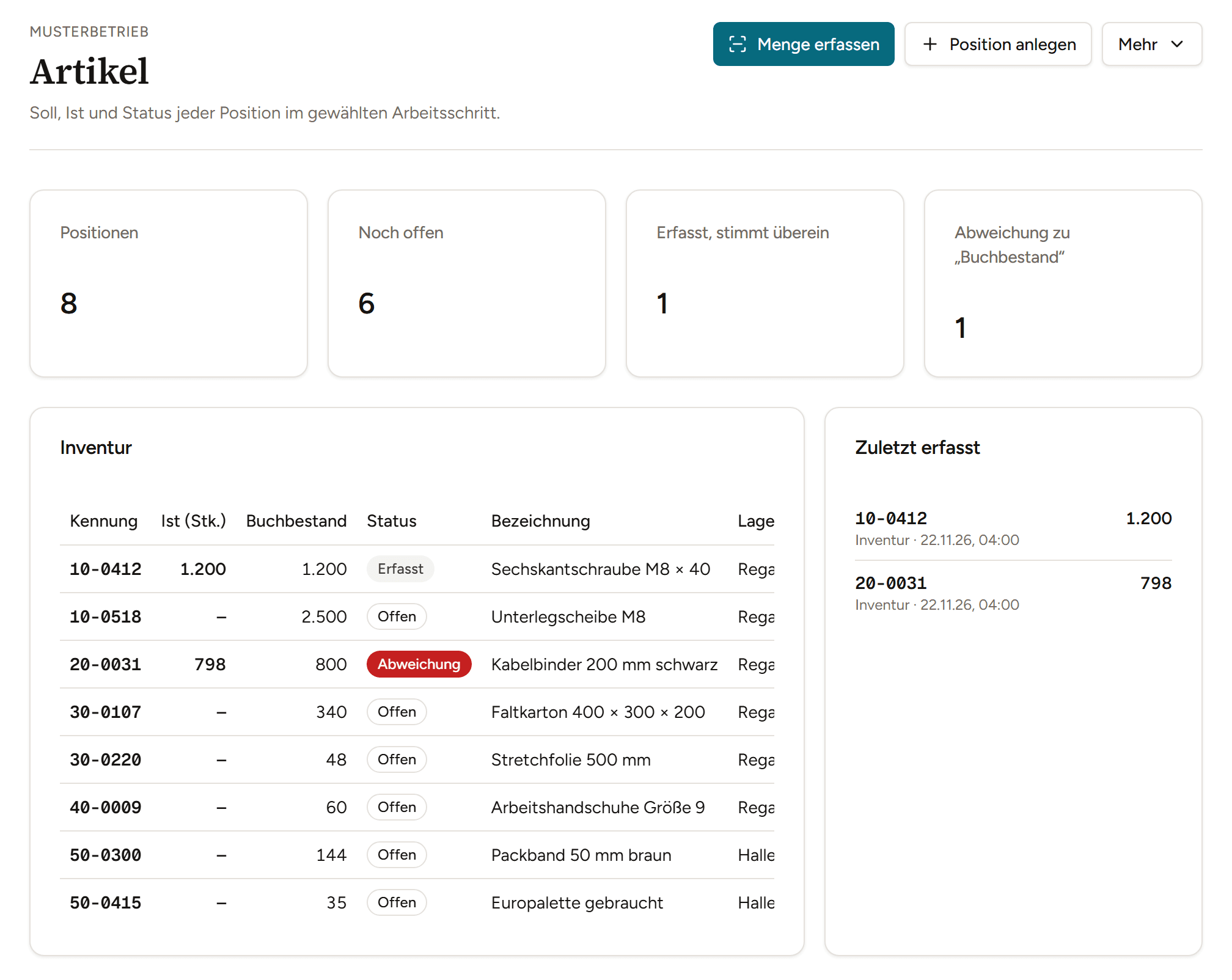
Stick labels on the material, scan them with your phone and enter the counted quantity. In the same list, keep count of how much has already been cut or packed. Inventurklar is the stock list for your company. What should be there, what was counted and where it differs: everyone in the company sees it as soon as they open the list.
14 days, no payment details. All you need is an email address.
Sound familiar?
You keep your stocktake list as an Excel file in the office. In the warehouse you write the quantity on the material with a marker. You send a photo of it to the office from your phone. Someone there types it in. In the end someone asks: which number is correct now?
Count where the material is.
With Inventurklar you enter the quantity at the shelf. In the app this is called Record quantity. Stock, your list, puts the target next to the actual: what should be there and what was counted. Every deviation is in the list as soon as the quantity is recorded. Office, warehouse and machine see the same figures.
What changes
See deviations while the count is still running.
Keep count of how much has already been cut or packed.
Stick a label on the material.
Stay with Excel where you need it.
What you get
Everything that is in Inventurklar. These are the names the app uses, too.
Stock: your list of all items with target, actual and status, for every work step separately. Up to 12 work steps.
Record quantity: type the identifier or scan the label, enter the quantity. For every work step you decide: Count (the new value replaces the old one) or Add up (the entries add up). The log shows who recorded what and when.
Add an item: add, change and delete items by hand.
Labels: with identifier, QR code and a free line for the quantity. Three paper sizes: A4 sheet with 24 labels, roll 62 × 40 mm, roll 100 × 60 mm.
Excel: upload an Excel file (.xlsx) with up to 5,000 items and check it before you apply it. Download list and log as an Excel file.
Setup: define fields of your own, for example location, batch or format, and work steps of your own. Up to 30 fields.
Template: six templates to start from: General warehouse, Wood and sheet materials, Metal, Plastics and films, Textiles, Your own setup. Five of them come with example data.
Team: invite colleagues by email, as Management or as Staff. Management sets things up, Staff does the counting.
Install as an app: put Inventurklar on your phone's home screen and start it from an icon of its own.
Billing: view invoices, change payment details, cancel the subscription.
Where Inventurklar comes from
The idea came from a company that processes laminate. Stocktake, cutting and milling ran on slips of paper, markers and Excel there. The predecessor of Inventurklar was built for that company. Today every company defines its own fields, work steps and labels.
There are no customer quotes yet. Inventurklar is new.
One subscription for the whole company
- All the features from the list above.
- The price covers the whole company. Each additional person costs nothing.
- Pay monthly or yearly. Both give the same access.
€29.00 per month€290.00 per year
Try it free for 14 days, no payment details. After that your list stays readable. You can change it again with a subscription. Nothing is deleted.
You sign in with your email address, set up your company and choose a template. Then your first list is there.
The order form cannot be reached right now. Try it free first and subscribe later in the app under Plans.
The purchase is handled by Digistore24. You can cancel in the menu under Billing. Consumers have the statutory 14-day right of withdrawal; the withdrawal information is in the order form.